AI insights & Ask 86’d
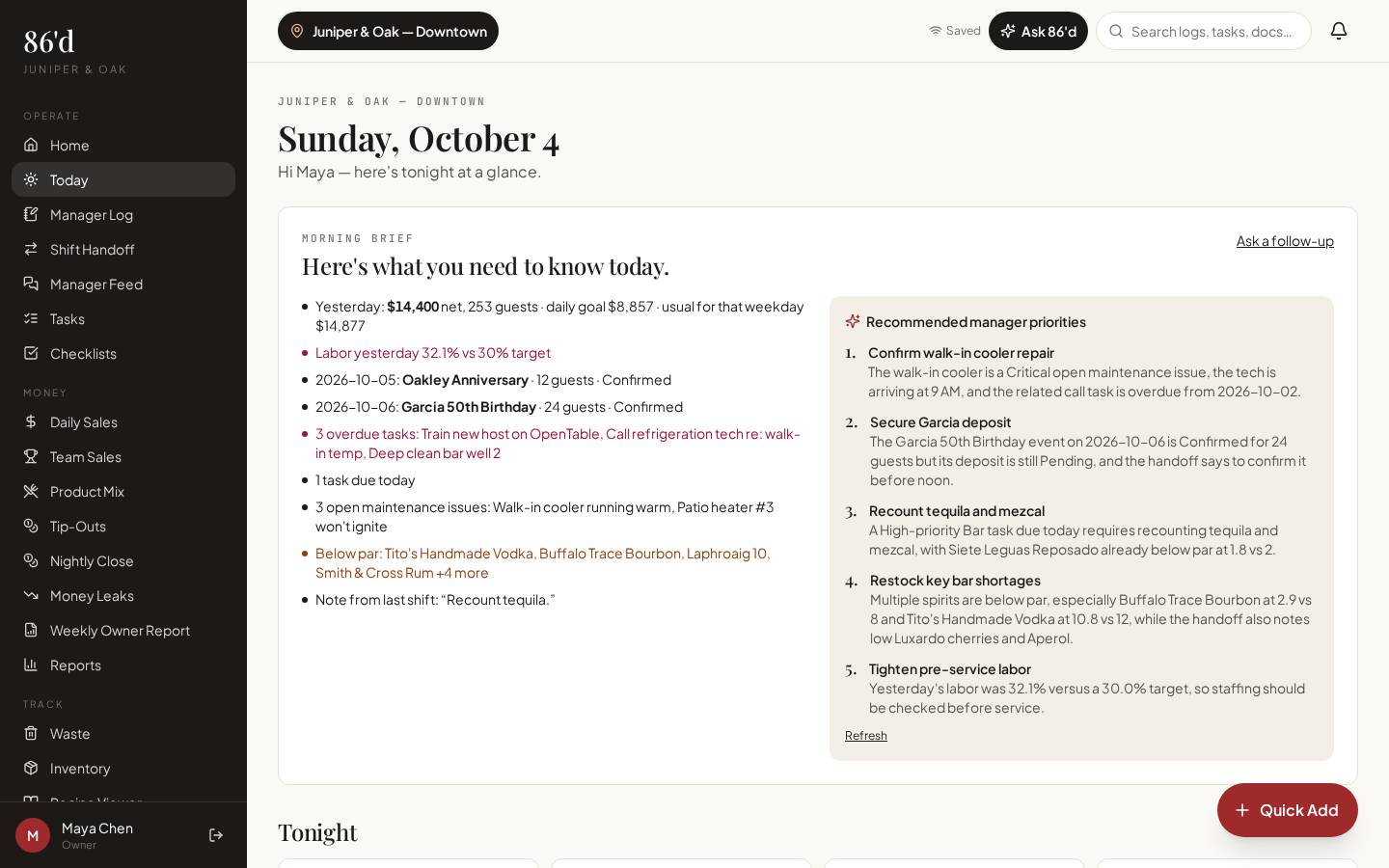
Ask 86’d and the Morning Brief read a defined set of your restaurant’s records, scoped to what the person asking is allowed to see, and suggest where to look and what to do next. They separate what the data shows from possible causes, name the period and source, and say what data is missing. A manager decides what to do.
AI summaries are in Operations Pro and Group. Ask 86’d answers are limited to what each user is permitted to see.
- Owners and GMs
- Department managers
- Employees (coaching questions about their own performance)
Data alone doesn’t say what to do, and generic AI advice doesn’t know your restaurant.
A starting point grounded in your records, with the reasoning visible so you can check it.
What’s included
What it reads
Daily sales for the last 8 weeks (financial access only); open tasks; recent manager logs and handoffs; open maintenance; guest issues and incidents from the last 30 days; events in the next 14 days; waste for the last 30 days; products below par; top product-mix items for the last 30 days (financial access only); team roster; your Restaurant Builder profile and targets.
Permission scoping
Anything the user can’t see in the app is excluded and listed as not visible.
Morning Brief
A short list of today’s priorities on the Today page.
Coaching
Employees can ask about their own shift sales and report card.
Off switch & privacy
Owners can turn AI off. 86’d doesn’t use your data to train models.
Walkthrough
- 1Tap Ask 86’d at the top of any page.
- 2Ask a question, e.g., “Why was labor high last week?”
- 3Read the answer: the facts it found (with dates), possible causes to check, and suggested actions.
- 4Check the cited records, decide what to do, and assign tasks if needed.
What you need
- The records listed under “What it reads”
- None required
- Same as the app—financial data only with financial access
What it produces
- Answers with sources and periods
- Suggested action plans
- Morning Brief priorities
How it connects
- Sales & reporting
Sales and product mix
- Daily tasks & communication
Logs, tasks, maintenance and incidents
- Inventory & invoices
Below-par items and waste
Facts (from approved invoices, Sep 1–28 vs. Aug): beverage purchases rose while beverage sales were flat. Possible causes (not confirmed): a supplier price change, pour size, or unrecorded waste. Suggested actions: compare the two latest invoices for top products, spot-check pours for three cocktails, and remind the bar team to log waste. Follow-up: compare next month’s numbers.
Illustrative only—not a customer result.
Questions
Are AI answers guaranteed to be right?
No. They depend on the data you’ve recorded and should be checked against the cited records. They don’t guarantee savings or results.
Can staff see financial data through AI?
No. Ask 86’d only uses what that user can already see in the app.
Is my data used to train AI?
86’d doesn’t use your data to train models, and owners can turn AI features off.
Related
Sales & reporting
See sales, labor, discounts and open issues for each location, compared with your own targets.
Read moreDaily tasks & communication
Manager log, shift handoff, manager feed, tasks, checklists, incidents, inbox and documents.
Read moreInventory & invoices
Counts, par levels, vendors and AI-assisted invoice capture you review line by line.
Read moreHow 86’d’s AI suggestions use your restaurant data—and where they stop
Read moreLast reviewed 2026-10-04. All guides
Know what’s happening in your restaurant—and what needs attention.
Start a 14-day free trial—no card required—or talk with us about your restaurant.