Know what’s happening in your restaurant—and what needs attention.
86’d by 86operations brings restaurant operations into one connected workspace, helping owners and their teams understand performance, coordinate daily work, and turn the restaurant data they record into practical next steps.
Read the transcript (60 seconds, captions available in the player)
Running a restaurant means keeping track of a thousand moving parts.
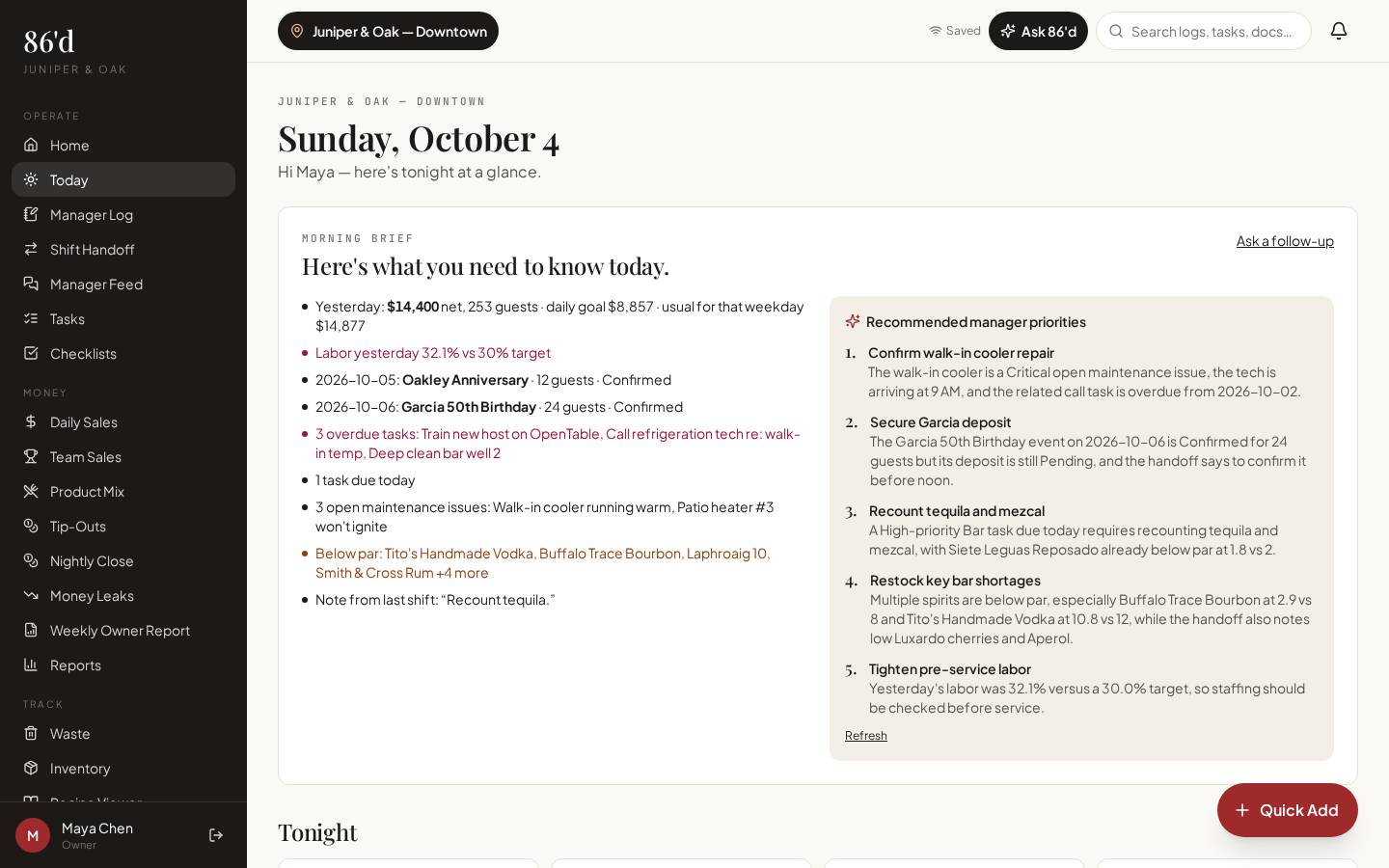
With 86’d, see what’s happening and what needs your attention.
Sales reports give owners clarity.
Employee report cards help managers coach.
Tip-out tracking gives staff clear shift breakdowns.
Inventory, invoices, and recipe costing help kitchen and bar leaders track purchasing costs, understand margins, and investigate waste.
Tasks and checklists show managers what’s complete.
The manager feed keeps issues on the record, so owners can stay informed.
And when your numbers reveal a problem, 86’d helps you understand where to look, with AI insights and suggested action plans grounded in your restaurant’s actual data.
Give your team direction. Give yourself clarity. 86’d. Know your restaurant. Lead with confidence.
Explore 86operations.com.
What it covers
Sales & reporting
See sales, labor, discounts and open issues for each location, compared with your own targets.
Read moreEmployees, report cards & tip-outs
Import your roster, run a four-step nightly close, publish tip-out statements and coach with report cards.
Read moreDaily tasks & communication
Manager log, shift handoff, manager feed, tasks, checklists, incidents, inbox and documents.
Read moreInventory & invoices
Counts, par levels, vendors and AI-assisted invoice capture you review line by line.
Read moreRecipes, costing & waste
Plate and pour costs from your invoice prices, cost % against target, and a waste log.
Read moreEvents & BEOs
Banquet event orders with deposits, revisions and a printable sheet your team can follow.
Read moreIntegrations & data imports
How data gets into 86’d: manual entry, file uploads, scanned reports, and live connections.
Read moreAI insights & Ask 86’d
Questions answered from your own restaurant records, with sources, periods and suggested next steps for a manager to review.
Read moreEmployee app
Staff see their own tip statements, tasks, checklists, published schedule, growth and messages on their phone.
Read moreSetup, permissions & security
Restaurant Builder, team invites, individual permissions and security controls.
Read moreWho it helps
Owners & multi-location operators
Sales, labor, discounts and open issues for each location against your targets, with a “needs attention” list and a weekly owner report.
General & assistant managers
Manager log and handoffs, nightly close and tip-outs, tasks, checklists and the management inbox.
Kitchen & bar leaders
Counts, invoice capture, recipe and pour costs, and the waste log.
Employees
Their own tip statements, report cards, tasks, checklists, published schedule and messages.
Event coordinators
BEOs with deposits, revisions and a printable sheet.
From restaurant data to an action plan
Demonstration with hypothetical numbers—not a customer result. Ask 86’d reads only records you’ve entered and that the person asking is allowed to see. How the AI uses your data.
- Step 1Sources & period
Approved invoices and daily sales, Sep 1–28 vs. Aug 1–28
- Step 2What the data shows
Beverage purchases rose; beverage sales were flat
- Step 3Possible causes (not confirmed)
Supplier price change, pour size, or unrecorded waste
- Step 4Suggested actions
Compare the latest invoices for top products, spot-check three pours, remind the bar to log waste
- Step 5Management review
The bar manager picks actions, assigns tasks and compares next month
Getting started
- 1Set up your restaurant
Start a 14-day trial (no card). In Restaurant Builder, add locations, departments, hours, sales categories and targets.
Guide - 2Bring in your data
Type or scan daily sales, import CSV exports, upload your employee roster (.csv/.xlsx), add products and capture invoices. A direct Toast connection is Planned (not yet available).
Guide - 3Invite your team
In Team Members, create invite links for employee portal or management accounts and choose each person’s role.
Guide - 4Set permissions
Choose each person’s modules, locations and financial access. Turn on report-card sharing if you want employees to see theirs.
Guide - 5Use the reports
Start each day on Today, close each night with Nightly Close, and review the Weekly Owner Report each Monday.
Guide
Questions
Does 86’d replace my POS, payroll or accounting?
No. 86’d works alongside them. Keep your POS for orders and payments, your payroll provider to pay staff, and your accounting software for the books. Tip-out reports show amounts before taxes; payroll is the final record.
Which integrations are supported?
Any POS that exports CSV or prints a report works through import or scanning. A direct Toast connection is Planned and not available until verified with a live Toast account. OpenTable is not available (partner approval required).
How do I import data?
Employee rosters (.csv/.xlsx), sales CSV exports (Toast, Square, Clover, Lightspeed or generic), product mix and product lists (.csv). POS report pages and invoices can be photographed; you confirm every value before it’s saved.
What can employees see?
Only their own tip statements, tasks, checklists, published shifts and—if you enable it—their report card. The personnel file stays with management.
How much does it cost?
Current prices are on the pricing page, billed per location per month (Group includes three locations), with a 14-day free trial and no card required.
How do I get support?
Visit Support or contact us. Optional paid onboarding sessions are on the Training page.
What security controls are in place?
Separate data per restaurant checked on every request, HTTPS, hashed passwords, MFA required for owners and financial/admin users (passkeys or authenticator app), session timeouts and remote sign-out, and no standing support access. 86’d does not currently hold security certifications. Details on Security & Trust.
Are AI suggestions guaranteed?
No. They’re based on the records you’ve entered, cite the period and source, separate facts from possible causes and need a manager’s judgment. They don’t guarantee savings or results.
Comparing tools? See how 86’d fits next to MarginEdge, Restaurant365, 7shifts and Toast, or read our resources.
Know what’s happening in your restaurant—and what needs attention.
Start a 14-day free trial—no card required—or talk with us about your restaurant.